7 Reasons Your Google Ads Get Clicks But No Enquiries

You log into your Google Ads dashboard. Clicks are up. Impressions look healthy. The numbers tell a good story.
Then you check your inbox. Nothing. You glance at your phone log. Nothing. The contact form sits quiet. Another week of budget gone, and not a single new lead to show for it.
If this sounds familiar, you are not alone. Google Ads getting clicks but no conversions is one of the most common, and most frustrating, problems UK SMEs face with paid search. It feels like Google is winning while your business is losing.
Here is the good news: clicks without enquiries is almost always a fixable problem. The cause is rarely the platform itself. The breakdown happens somewhere in the chain that sits between the click and the new customer, and once you know where to look, the fix is usually quick.
This guide walks you through the seven most common culprits, in the order you should check them.
First, Check the Most Likely Culprit: Your Tracking
Before you blame the campaign, make sure you are measuring it correctly. A surprising number of businesses are getting enquiries and simply do not know it.
Common tracking failures include:
- Conversion tags that were never installed properly
- Phone calls that ring through but go untracked
- WhatsApp enquiries that never appear in your reporting
- Form submissions that fire on the wrong page or not at all
- Offline conversions (such as deals closed by sales) that never make it back into Google Ads
If your GA4 setup, Google Tag Manager, or conversion actions in Google Ads are not configured correctly, you can run a successful campaign for months and never see a single conversion recorded.
We once audited a roofing client who reported zero enquiries from three months of paid search. The truth? The conversion tag had never been installed correctly. The leads had been arriving all along.
Run Google Tag Assistant, check your GA4 events fire in real time, and confirm your phone tracking is live before you change a single keyword.
Reason 1: You’re Bidding on the Wrong Search Intent
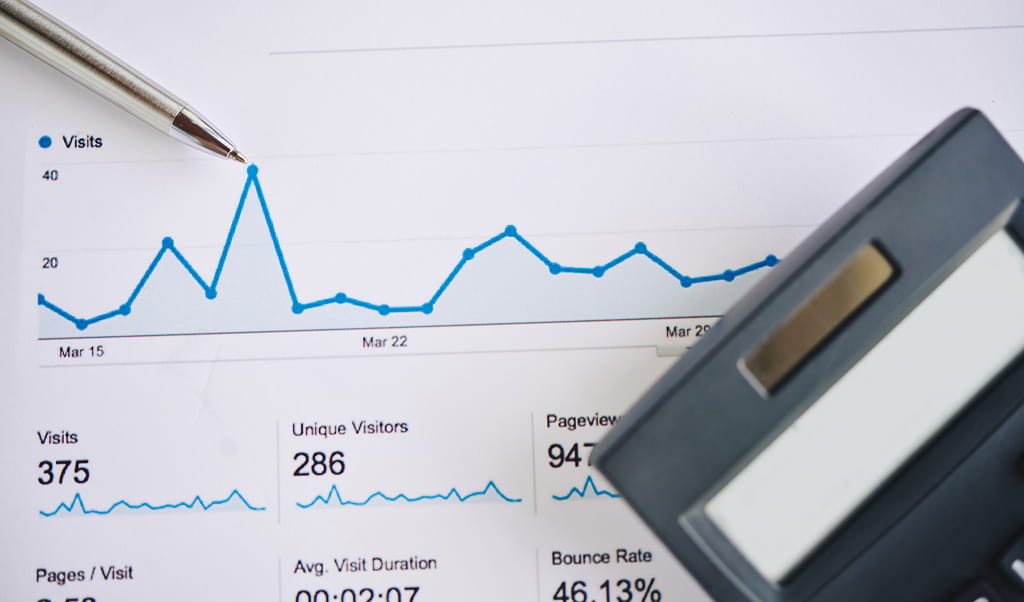
Google Ads getting clicks but no conversions often comes down to a simple targeting mistake: you are buying the wrong type of click.
Search intent falls into a few rough buckets:
- Informational (“how does a heat pump work”)
- Commercial (“best heat pump installer near me”)
- Transactional (“book heat pump installation Hertford”)
If your campaign is bidding heavily on informational keywords, your clicks are coming from people who want to learn, not buy. They will read your page, satisfy their curiosity, and leave.
A plumbing firm bidding on “boiler repair” will pull in clicks from DIY enthusiasts looking for a guide. A plumber bidding on “emergency boiler repair Hertford” will pull in clicks from someone whose boiler died this morning. Same industry, completely different buyers.
Audit your keyword list against the buying intent behind each term. Pause anything that looks like research and double down on what looks like ready-to-buy demand.
Reason 2: Your Match Types Are Letting in the Wrong Traffic
The Broad Match Problem
Broad match has changed significantly in recent years. It now triggers ads for searches that are only loosely related to your keyword, and the results can be brutal for SME budgets.
Your Google account manager will almost certainly push you towards broad match and AI-driven bidding. There is a reason for that: broad match spends more money, more quickly. Whether it spends it profitably is another question entirely.
For larger advertisers with rich conversion data, broad match can work. For most SMEs running tighter budgets, it tends to drain spend on the wrong searches.
Building a Negative Keyword List That Works
Negative keywords are how you tell Google what you do not want to show up for. The absence of a strong negative list is one of the biggest causes of Google Ads wasted spend we see when auditing accounts.
Open your search terms report and scan for:
- Job-related searches (“jobs”, “careers”, “salary”)
- Free seekers (“free”, “cheap”, “discount”)
- DIY phrases (“how to”, “tutorial”, “yourself”)
- Competitor brand names where you do not want to compete
- Irrelevant industries that share keywords with yours
Add these as negatives at campaign or account level. The savings are usually immediate.
Reason 3: Your Landing Page Is Doing the Wrong Job
The Homepage Trap
Sending paid traffic to your homepage feels logical. It is also one of the fastest ways to kill your conversion rate.
Homepages are designed for general browsers. They cover everything you do, link out to ten different sections, and give visitors plenty of ways to wander off. A user who clicked an ad about “commercial roof repair Hertfordshire” should not land on a page that also talks about flat roofs, guttering, and your company history.
A well-designed dedicated landing page speaks to one offer, one audience, and one action.
What a Converting Landing Page Actually Looks Like
The strongest Google Ads landing page conversions share a few traits:
- The headline matches the promise in the ad copy
- One clear call to action sits above the fold
- Trust signals appear early: reviews, accreditations, recognisable logos
- The phone number is in the header, not buried in the footer
- Forms ask only for what is genuinely needed
- The design is mobile-first with click-to-call functionality
We worked with a client whose phone number sat at the bottom of the page. Visitors browsed, did not see how to make contact easily, and left. Moving the number to the header and adding click-to-call lifted enquiries within days.
Reason 4: Your Site Is Too Slow to Convert

Speed kills conversions, and most SMEs underestimate how badly.
Google’s own research shows that pages loading in one second convert around three times higher than those taking five seconds. Around 53% of mobile users abandon a page that takes longer than three seconds to load.
If your site is sluggish, you are paying for clicks from people who never see your offer. The ad worked. The website let them down.
Quick wins include:
- Compressing images properly (most sites carry far heavier files than they need to)
- Removing scripts and plugins that no longer serve a purpose
- Choosing better hosting
- Implementing browser caching
This is also where good website design and build earns its money. A fast, well-built site lifts every campaign you run on top of it.
Reason 5: Performance Max Is Spending Your Budget in the Wrong Places
Performance Max is Google’s automated, AI-driven campaign type, and it is one of the biggest sources of low conversion rate Google Ads complaints we see.
The problem is not Performance Max itself. It is the lack of control. Without active management, PMax has a habit of pushing budget into:
- Low-quality mobile game placements
- Irrelevant display sites
- Branded searches you would have won organically anyway
The result looks like conversions on paper but produces little real business value.
If you are running PMax, take the time to:
- Apply account-level placement exclusions
- Use brand exclusions so you do not pay for your own brand traffic
- Structure asset groups tightly around specific products or services
- Monitor conversions for quality, not just quantity
For most SMEs, well-structured search campaigns deliver better results than letting PMax do its own thing.
Reason 6: Your Forms and Enquiry Process Are Driving People Away
You can do everything else right and still lose leads at the final step.
HubSpot’s data shows forms with more than five fields cut conversions by roughly half compared to shorter forms. Every extra field is a small reason for someone to give up.
Look at your enquiry form with fresh eyes:
- Are you asking for information you do not really need at this stage?
- Is the form mobile-friendly?
- Are there alternative ways to get in touch (WhatsApp, callback request, live chat)?
- Is the phone number prominent?
Then look at what happens after the enquiry. We have audited businesses where the common marketing mistakes were not in the campaign at all, but in response time. A 48-hour reply to a hot lead is a lost lead. By the time you call back, your prospect has likely already booked a competitor.
Around 60% of B2B enquiries in service industries still come by phone. If you have no call tracking and no follow-up process, no campaign on earth will save you.
Reason 7: You’re Judging Results Too Early or Without Context
A fortnight is rarely enough data to judge a Google Ads campaign, particularly for B2B businesses with longer sales cycles.
A click today might be an enquiry in three weeks. Someone might click your ad, browse, leave, return via organic search, then call. To you, it looks like organic delivered the lead. In reality, paid search did the heavy lifting.
GA4 view-through and assisted conversions help paint a fuller picture. So does looking at trends over four to six weeks, not four to six days.
Pausing a campaign too early is a classic mistake. So is changing too much, too quickly, before you have enough data to know what is actually working. Patience and proper measurement go hand in hand.
If you want to dig deeper into how marketing channels really work together, our piece on picking marketing channels is worth a read.
So, Where Is Your Campaign Actually Leaking?

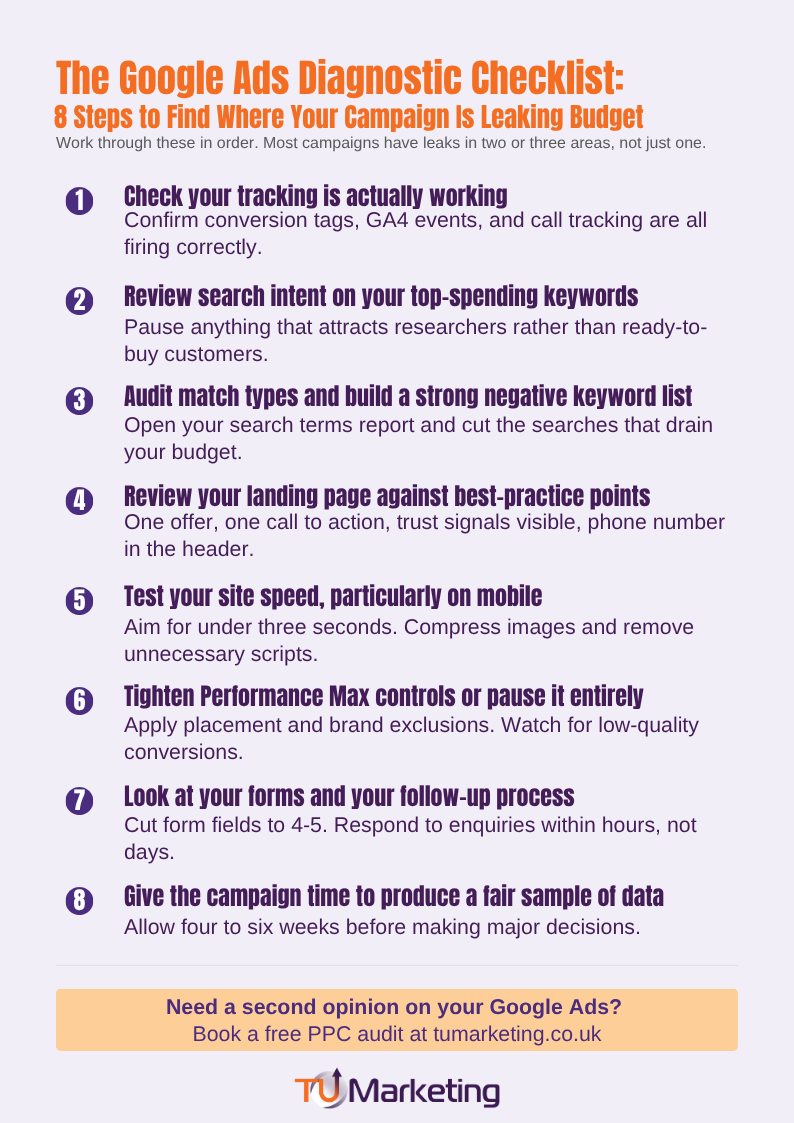
If your google ads not converting problem feels overwhelming, work through the diagnostic in this order:
- Check tracking is actually working
- Review search intent on your top-spending keywords
- Audit match types and add a robust negative keyword list
- Review your landing page against the points above
- Test your site speed, particularly on mobile
- Tighten Performance Max controls or pause it entirely
- Look at your forms and your follow-up process
- Give the campaign time to produce a fair sample of data
Most accounts have leaks in two or three of these areas, not just one. Fix them in order, and the difference in low conversion rate google ads results is often dramatic.
If you would rather have an expert eye on your campaign, our team offers PPC audits that pinpoint exactly where your budget is going and what is stopping it from producing enquiries.
Why You’re Getting Clicks but Not Enquiries
It almost always comes down to a tracking gap, a targeting mismatch, a landing page problem, or a process bottleneck somewhere after the click. Rarely is the platform itself to blame.
The fastest route to better results is a methodical audit, not a panicked campaign pause. Work through the seven reasons above in order, fix what you find, and give the data time to settle.
If you would like an expert eye on your account, get in touch with the team. We have been helping UK businesses turn clicks into customers since 2007, and a free audit will tell you exactly where your campaign is leaking budget.